Link buying works when you decide what each link must look like before you shop, then pick where to buy it, check the site, get the terms in writing and pay only once you have seen the live link yourself. Most expensive mistakes happen when buyers shop by price and Domain Rating first (DR, a 0 to 100 score of how strong a site's own backlinks are).
This guide walks through how to buy backlinks for clients step by step: what Google allows, what you can buy and what to refuse, how many links to buy a month, how to compare quotes and how to check a link before you pay. It is written for agencies and freelancers who buy links for clients.
What Google says about paid links
Google's spam policies call buying or selling links to boost rankings "link spam". But the same page says paid links are a normal part of advertising, as long as they are labeled. The label is a small tag in the link's code, called a rel attribute.
- rel="sponsored" tells Google the link was paid for. Google's guide to labeling outbound links says this is the preferred tag for paid placements.
- rel="nofollow" tells Google not to pass ranking credit through the link. It is also accepted for paid links.
So every purchase takes one of two shapes. A paid link tagged as sponsored follows the rules, and on a relevant site it still sends readers. A paid link made to look like a normal editorial link is what Google calls spam.
The penalty for the second shape is specific. Google's manual actions report lists "Unnatural links to your site" as the action it takes when it finds a pattern of bought or manipulative links pointing at a site, and says it can affect some or all of the site. The fix is slow: remove or tag the links, disavow what you cannot remove, then file a reconsideration request and wait. Plenty of buyers take that risk anyway. Either way, the client makes the call, in writing, before the first order, and you record the choice on every order so nobody is surprised later.
What other buyers pay and look for
A 2025 survey of 518 SEO professionals, reported by Search Engine Land, gives a useful picture of active link buyers. It was run by a company that sells link building, so treat it as a view of people already buying.
| Finding | Respondents | What it means for your budget |
|---|---|---|
| Average acceptable price for one high-quality link | $508.95 | A useful ceiling to test client budgets against |
| Share of SEO budget spent on links | 32.1% at agencies, 36.0% in house | About a third of the plan goes on links |
| Outsource at least part of their link building | 56% | Vendors and resellers are a normal route |
| Open to sites that sell links if the quality is right | 63.1% | Most buyers judge the site, not the sale |
| Struggle to scale without losing quality | 67.2% | Volume is where standards slip |
| Say premium links are too expensive | 75.1% | Expect pushback on top-tier quotes |
| Expect link costs to keep rising | 80.9% | Build price reviews into retainers |
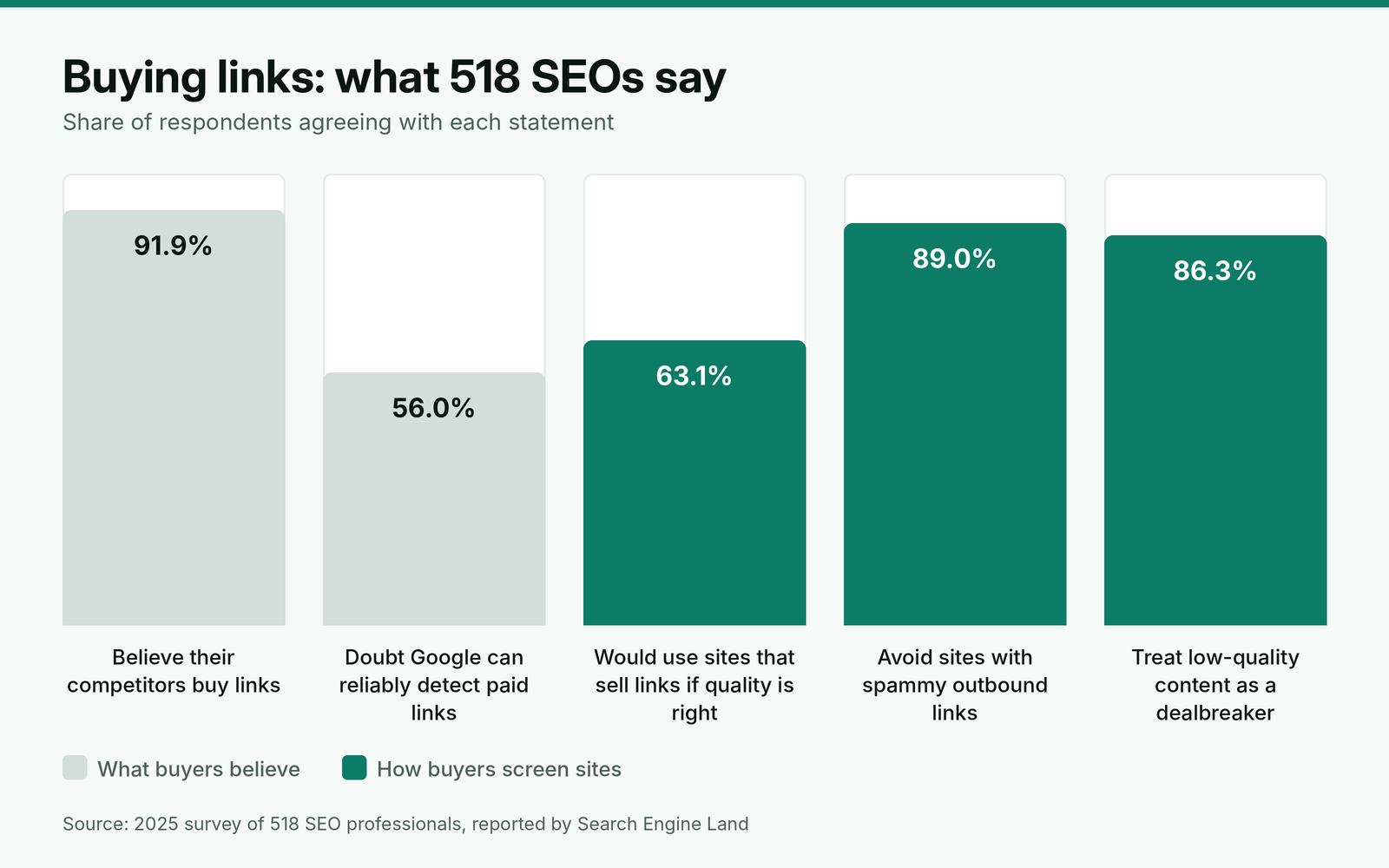
The screening habits are the part worth copying. 89% avoid sites with spammy outbound links (links from the site to casinos, loan sites and the like), and 86% reject sites with low-quality content. Those two checks remove most of the sites that sell links to anyone who pays.
What you can buy, and what to refuse
Sellers use different names for the same few products. Sort every offer into one of these rows before you talk price.
| What is on offer | What you get | What to check first | Our call |
|---|---|---|---|
| Sponsored guest post | A new article on the site with your link in the body | Recent posts are written for readers, not for link buyers | Buy, tagged as the client chose |
| Niche edit | Your link added to an article that already exists | The article already ranks or gets traffic, and the new sentence fits | Buy, with the exact URL and paragraph agreed |
| Sponsored article on a news or trade site | A labeled partner piece, often in its own section | Whether the section is indexed and linked from the main site | Buy for readers and brand, rarely for rankings |
| Sitewide or footer link | One link repeated on every page of a site | Whether it is paid and followed | Refuse if paid and untagged |
| Network or farm site | A link on one of many sites run by the same seller | Shared hosting, templates, authors and outbound links across the list | Refuse |
The last row is where cheap bundles come from. Before you order from a new list, run how to spot a link farm in a seller's list and look for the footprints of a private blog network for sale. A seller that cannot tell you who owns each site usually owns them all.
Step 1: Write a short brief for each page
Before you look at a single site, write a brief for each page you want links to (the target page). It says what a good link must look like. Agree it with the client once, then judge every site against it.
A good brief covers:
- The target page and who it is for.
- The minimum monthly traffic a site needs, and its main country. Check this yourself rather than trusting a listing.
- How relevant the site must be. We use a simple 0 to 10 relevance score and only buy at 6 or above.
- Hard no's, such as sites whose recent posts link to casino, CBD, essay or loan sites.
- The anchor text, which is the clickable words of the link. Pick it from the anchor text mix each target page can carry.
- Whether the link will be tagged sponsored, as agreed with the client.
- Your maximum total cost per link, including your own time.
- How long the seller must replace a link that disappears.
How many backlinks to buy each month
Size the order from the gap, not from a package. For each target page, count the referring domains (separate sites linking to it) of the three pages ranking above it, take the average, and subtract what your page has. That gap, spread over the months the client will pay for, is the monthly count.
Here is a made-up example. A pricing page has 9 referring domains. The three pages above it have 31, 24 and 26, an average of 27, so the gap is 18. Over a six-month plan that is 3 links a month to that page. A second page with a gap of 6 gets 1 a month. The client buys 4 links a month, and you can explain every one of them.
Two limits keep this honest. A count only means something if the links meet the brief, so never fill the number with sites that fail it. And the gap moves: recount at each quarterly review, because competitors keep building too.
Step 2: Choose where to buy each link
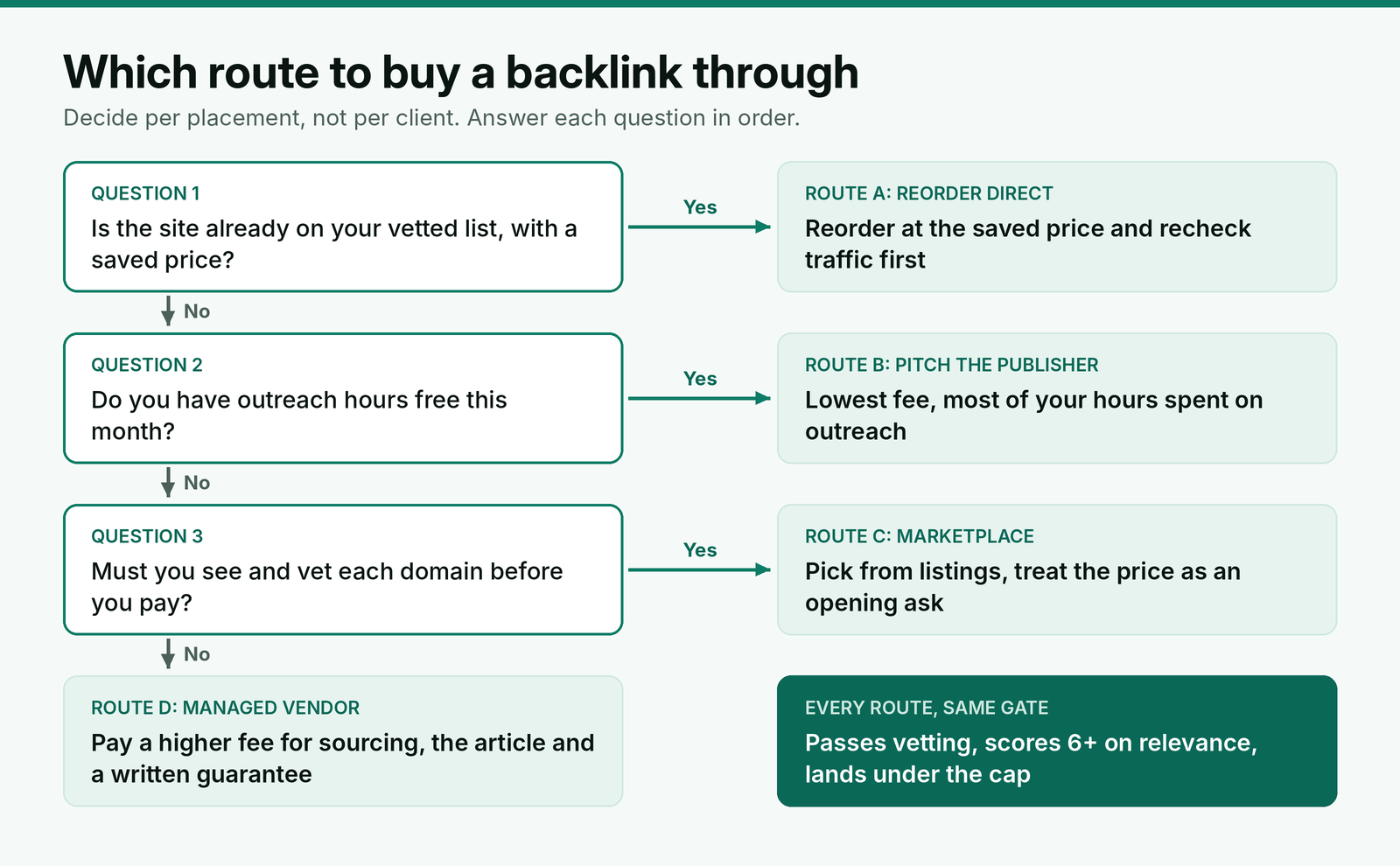
There are three ways to buy a link, and most agencies use all three in the same month.
- Direct from the publisher. Lowest price and most control, but finding and emailing sites takes your time.
- A marketplace. A website that lists sites selling links. You can browse and pick, but listed prices are opening offers and the platform takes a cut. Most of what is listed is weak, so read how to vet a marketplace listing and its seller before you order.
- A managed vendor. A service that finds the site, writes the article and usually replaces lost links. It costs the most per link.
Guest post prices by route show how big the gap can be. Decide per link, not per client. If you have bought from a site before and it still meets the brief, reorder there first. It is usually the cheapest and safest option. Once you buy from the same sellers every month, how many vendors to run and how to score them becomes the bigger question.
For the direct route, you need a way to email publishers at scale. For that outreach we recommend linkOreach. Its AI agent, Linkzy, builds prospect lists with DR and traffic data, writes a pitch for each site, sends it from your own domain and runs follow-ups that stop as soon as someone replies.
Step 3: Check each site
Run every site through the same checks, whatever route it came from. Start with the quick ones:
- Confirm its traffic and main country in your own SEO tool.
- Open the five newest posts and look at the sites they link to.
- Search the site for your client's topic.
Anything that hits a hard no is out. Then score relevance and drop anything under 6. Save the score against the site, so the next client in a similar niche can reuse it. The full list of website vetting checks goes further.
Expect most sites to fail. That is normal. Only negotiate with the ones that pass.
Step 4: Get the terms in writing
A price on its own is not a quote. Before you pay, get these in an email or order form you can point to later.
| Term | What to ask for | Warning sign |
|---|---|---|
| Price | Every fee in dollars, including writing and extras | "From $X", with extras added after you pay |
| Page | For a niche edit (a link added to an existing article), the exact URL and paragraph | "A relevant article", picked after you pay |
| Anchor and tag | Your anchor, target URL and rel tag, unchanged | The seller changes them without asking |
| Timing | A delivery date, and what happens if Google does not index the page (add it to search results) | "Usually two to four weeks", with no date |
| Replacement | How many months they will replace a lost link | Nothing in writing |
For guest posts, also ask to approve the article before it goes live. On payment, set a rule and stick to it. With a new publisher, pay after the link is live if they agree. If they insist on payment upfront, start with a single link. If a vendor requires payment upfront, the written replacement promise is your protection, so do not buy without one.
Example: comparing three quotes
Here is a made-up example. The client's brief allows $450 per link, all in. "All in" means the fee, any writing fee, your time (about $75 here), and a small amount set aside for links that may disappear later.
| Quote | All-in cost | Relevance and replacement |
|---|---|---|
| A: direct publisher | About $410 | 8 out of 10, 6 months |
| B: marketplace | About $470 | 7 out of 10, none |
| C: managed vendor | About $485 | 9 out of 10, 12 months |
Quote A is under budget, so buy it. Quote B looks cheap at first, but you have to write the article yourself. Once you count that hour, it costs about the same as the vendor, with no replacement promise. Ask for a lower price or walk away.
Quote C is over budget, but it is the most relevant and has the best guarantee. Ask the client, in writing, whether a top-relevance link can go over the limit. If not, ask the vendor for a better price on two links.
Step 5: Check the live link before you pay
A seller's "it's live" email starts your check. It does not end it. Before you pay the balance or bill the client, confirm:
- The link sits in the main article, not in a bio, footer or sidebar, which is the first test of whether a paid placement reads as an editorial link.
- It points to the exact page you ordered, with the agreed anchor text.
- It carries the agreed rel tag. Open the page source and follow how to check the rel value in the page source if you are not sure what to look for.
- The article is the one you approved (guest post), or the paragraph you were shown (niche edit).
- The page is not blocked from Google. Check it shows in search, or note a date to check again.
- The site's traffic still meets your brief.
Anything that fails goes back to the seller. Do not bill the client for a link that has not passed. A page that is live but not yet in Google's index is not a failure on day one, but it is by day 30; our steps for getting a bought page into Google's index cover what to ask the publisher to change before you claim a replacement.
Step 6: Record it and check it again
A bought link can disappear. Recheck each one before its replacement period ends. A claim made the day after it closes costs you the full fee. Our guide to spotting a missing paid link and claiming it back sets out the timing.
Keep the date checked, the live URL, the anchor, the tag and the replacement end date on the order. These same details make up the placement log in your monthly client report. If a recheck shows the site has since turned into a link seller, decide whether those toxic backlinks need a tag, removal or disavow before one bad site becomes a pattern.
Common mistakes and red flags
- Buying on DR alone. A high-DR site that covers every topic is often the one selling links to anyone. Check relevance first and use DR as a tiebreaker.
- Paying before the terms are in writing. Without them, you have no claim if something changes.
- Buying bundles. A "10 links for $X" package hides the ones you would have rejected. Check each link on its own.
- Trusting a promise that no tag will be added. A seller who guarantees untagged links to every buyer is selling the pattern Google's manual action describes.
- One list for every niche. The same 200 sites offered to a dentist, a casino and a SaaS client means nobody is choosing sites for readers.
- Hiding the purchase from the client. If the client did not agree to the risk, they will blame you for any ranking drop.
Where BuildLinks fits
This process gets messy when briefs live in one document, quotes in email, scores in a spreadsheet and invoices somewhere else. BuildLinks keeps them together. Each client's brief and instructions sit on their account, so whoever quotes the next order can see them.
The domain list filters by DA and DR (two common site strength scores), traffic, service type, turnaround and country. You can keep a saved domain list with your price for each client, and a new domain must be approved before anyone can quote it.
Each link is an order with a status. The link is rechecked when it goes live, the target URL and anchor are locked once placed, and the invoice is created from the completed order. Agencies see their cost next to each client's price, and clients see only their own price. That is one order from brief to invoice. Set your resale price for link building on top of the buy price. BuildLinks manages orders, domains and invoices. It does not find publishers or score relevance for you.
Conclusion
Write a brief for each target page before you shop: traffic you check yourself, a relevance score of 6 or more out of 10, the hard no's, the anchor, the tag the client chose in writing, a maximum all-in cost and a replacement period. Size the monthly count from the referring domain gap to the pages above you, buy guest posts and niche edits, and refuse untagged sitewide links and anything from a network or farm.
Choose the route link by link, reordering from sites you already trust first, and run every site through the same checks. Get price, page, anchor, tag, timing and replacement terms in writing, compare quotes on all-in cost and quality, and pay only once the live link passes your own check. Recheck indexing by day 30 and every link before its replacement period ends.