Complete OS for Link Building Workflow Management
BuildLinks holds the domain list you price from, the order you're placing, and the invoice it becomes - so your team stops checking three places to answer one question.
No credit card to start. Cancel anytime.
The setup you're running today has three owners.
A spreadsheet, a group chat, and an inbox - none of them know the other two exist.
What comes off your week.
Six jobs a link building team does by hand, and what happens to each once the domain, the order, and the invoice live in one place.
Opening a published page to check the link is there
Rechecked the moment it publishesA guest post or niche edit is verified live before its order is marked Completed.
Building an invoice from a spreadsheet row
Written when the order completesLine items, price, and due date come from the work that was done.
Answering “where is my order?”
Clients look it up themselvesEach client logs in and sees their own orders and invoices.
Digging through old messages for a client's rate
Saved on the domain, per clientSet a price once and it is there for every later quote.
Chasing a bank transfer
Paid from a wallet balanceClients top up or redeem a coupon, and invoices settle from the balance.
Writing the same status email again
Sent for youTwelve system emails go out automatically, from invoice sent to password reset.
From an empty list to a paid invoice.
Three things have to happen for a placement to earn money. BuildLinks carries all three.
Know what you can sell
Every domain you place on goes into one list, with its rating, traffic, your price for that client, and how long it actually takes.
Let the order track itself
Pending becomes In Progress becomes Live on its own - the link gets rechecked the moment it publishes, no one has to go look.
Get paid without a reminder
A completed order turns into an invoice by itself, branded to you, on your own domain if that's how you sell it.
The platform, piece by piece.
Four parts that hand off to each other. Pick one to see what it does.
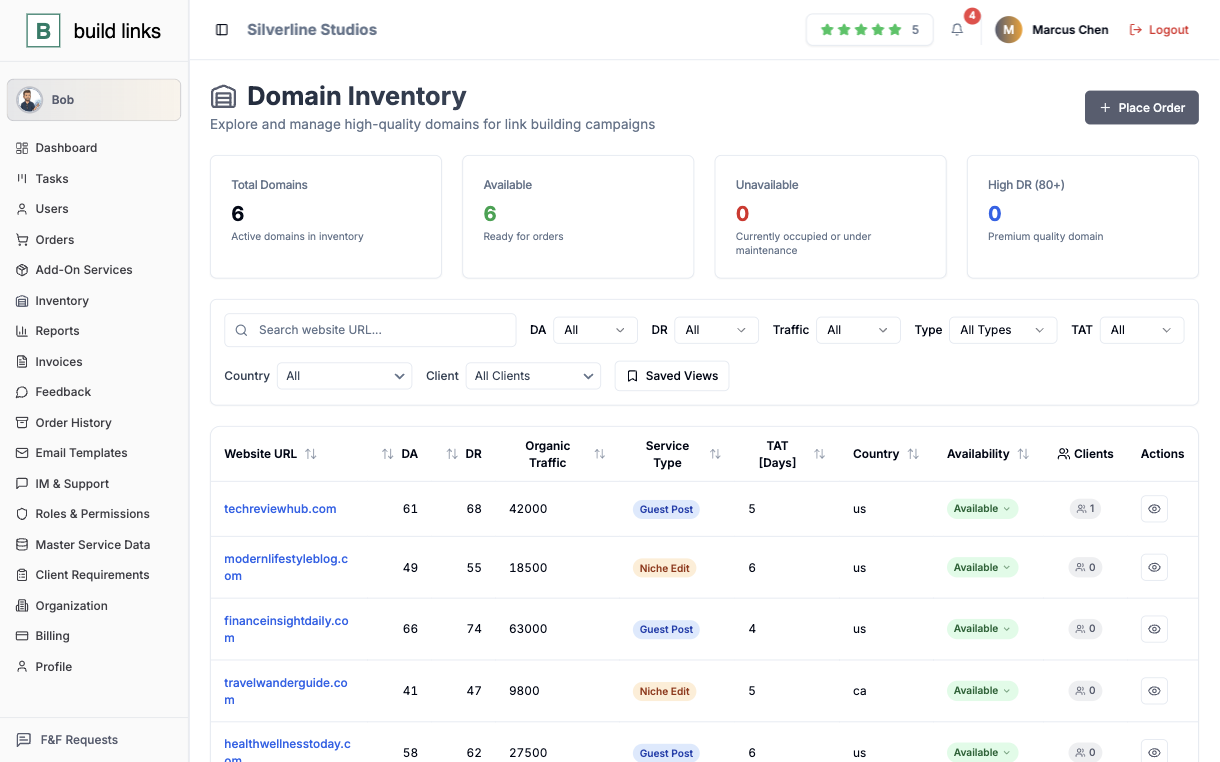
The price list that doesn't get rebuilt every time a vendor changes a rate
Every site you place links on lives in one list instead of a spreadsheet tab someone has to remember to update. Rating, traffic, and typical turnaround get recorded once per domain, alongside your own price for that specific client, so quoting the next order means picking from what's already there.
- Rating, traffic, and turnaround saved once per domain
- A separate price per client, set once and reused on every quote
- Filterable by service type before an order is ever placed
A status you can actually check your work against
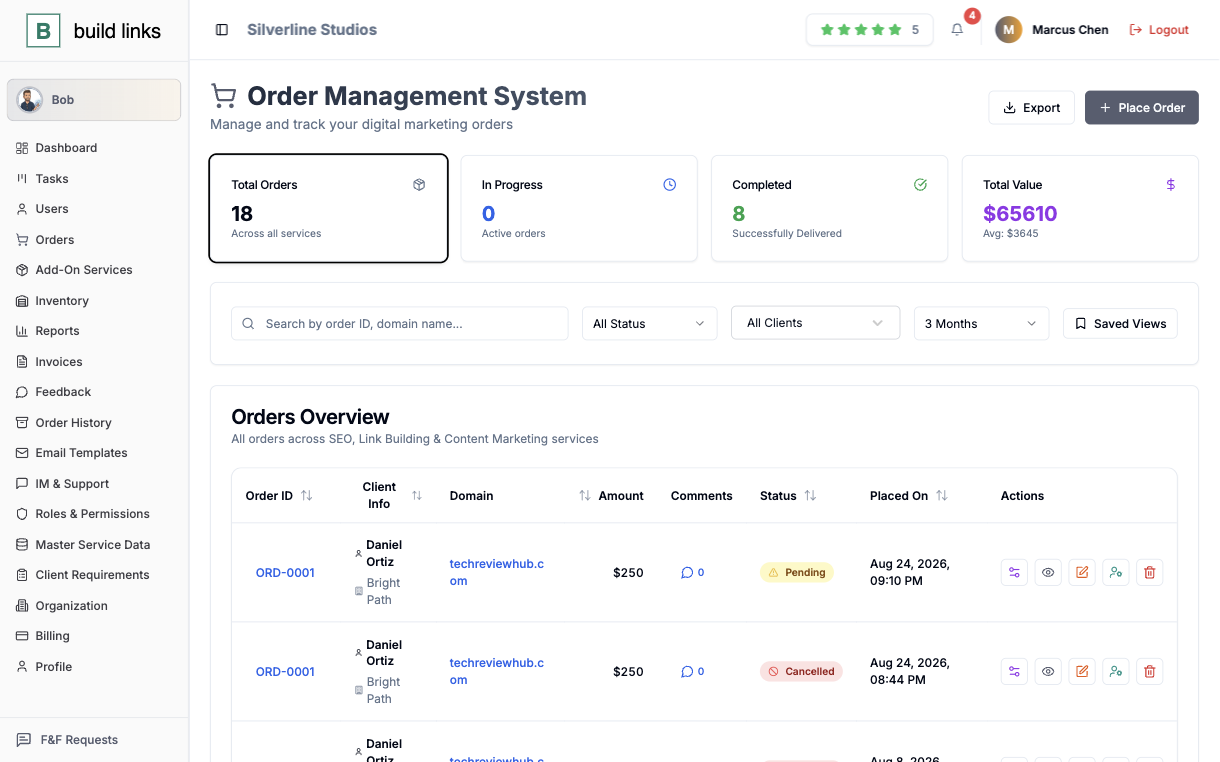
An order carries its real state, checked against the live link rather than assumed at standup. The moment a guest post or niche edit publishes, BuildLinks re-verifies it's actually live before marking anything Completed. Every prior state stays on the order's timeline, so a dispute months later has an answer.
- Live-link verification runs the moment a placement publishes
- Target URL and anchor text lock once an order is placed
- Full history stays on the order as it moves through every stage
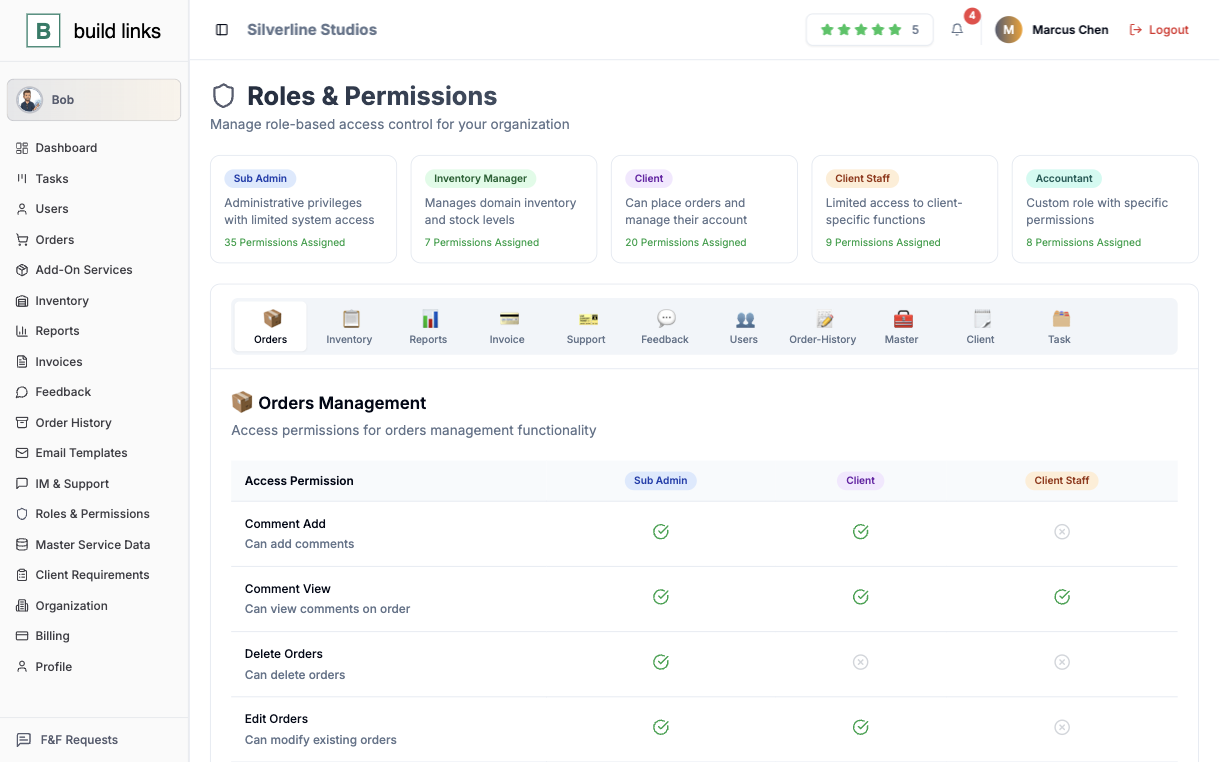
Six jobs, six separate views of the same account
A Super Admin sees everything. A Sub Admin runs their own clients and nothing outside that. An Inventory Manager keeps domains current with no billing access at all. Accountants see money, Clients see only their own orders, and Client Staff logins extend that same narrow view to a client's own team.
- Six roles, each scoped to exactly what that job needs
- Client Staff logins for teams sitting on the client side
- Every action attributed to the person who actually took it
An invoice that exists before anyone thinks to write one
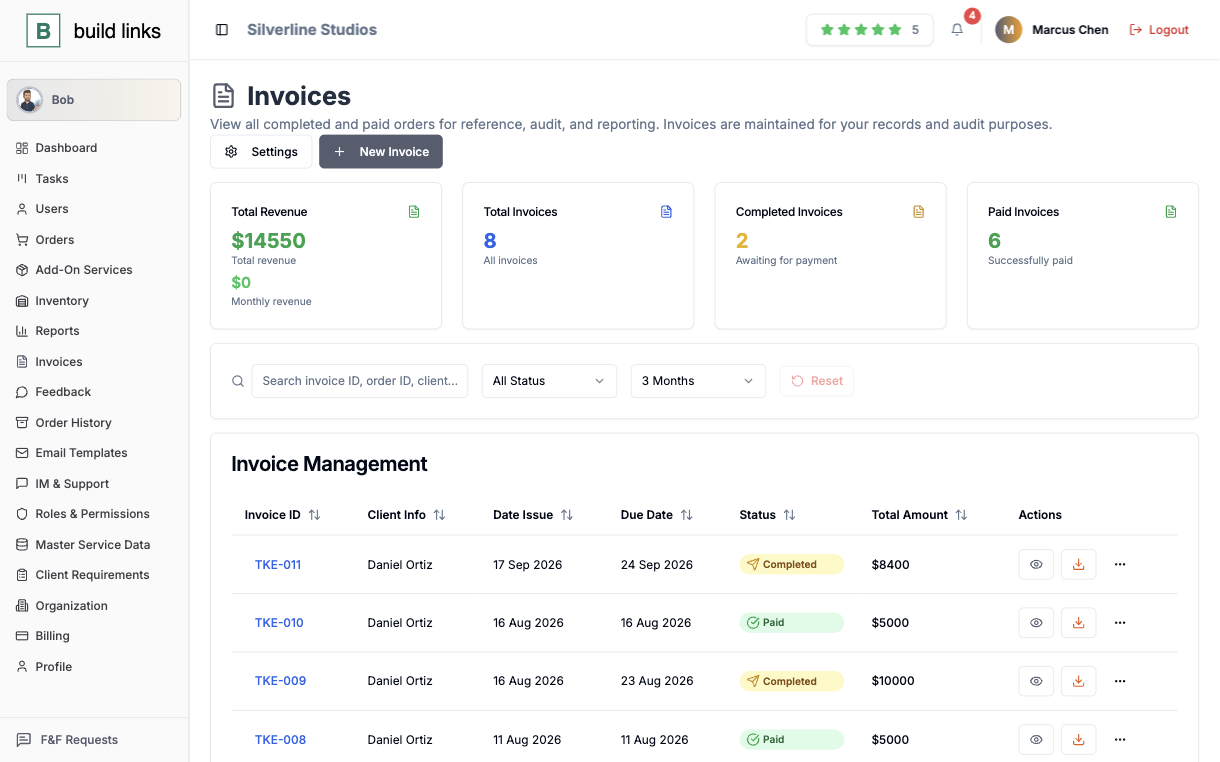
Finishing an order finishes its invoice too - line items, pricing, and a due date all pulled from the work that was actually done. Standard due-date rules apply per client automatically, and every invoice downloads as a branded PDF, so nobody on your team is rebuilding one by hand at the end of the month.
- Generated automatically the moment an order is completed
- Due-date rules set once per client, applied every time
- Downloadable PDF invoices, branded to you
And the rest of what keeps a team moving.
A balance instead of a wire transfer
Fund it with a credit, a bonus, or a discount you build yourself, and let a client pay straight out of it.
A to-do list that knows the order
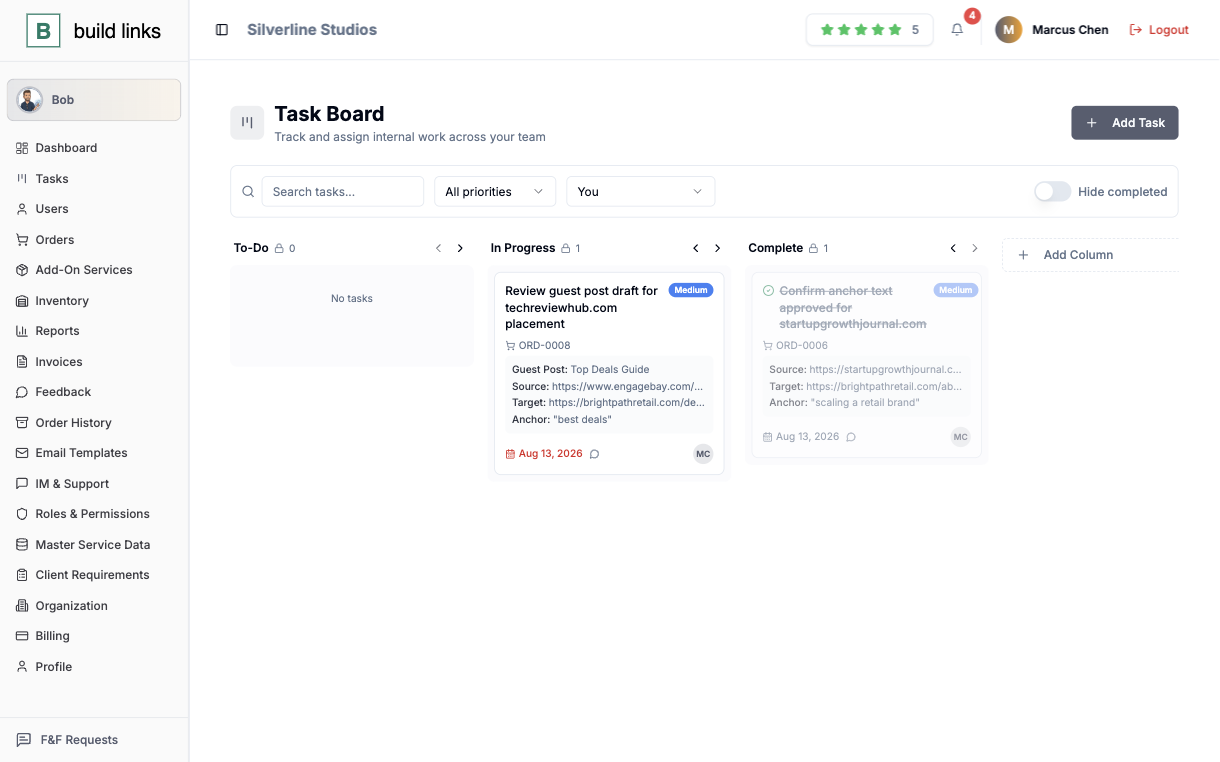
A kanban card for the work behind a placement already carries its anchor text and target URL - nobody has to go dig for them.
A name attached to every change
Every change in an account is logged to whoever made it - Bob included.
Your own numbers, on demand
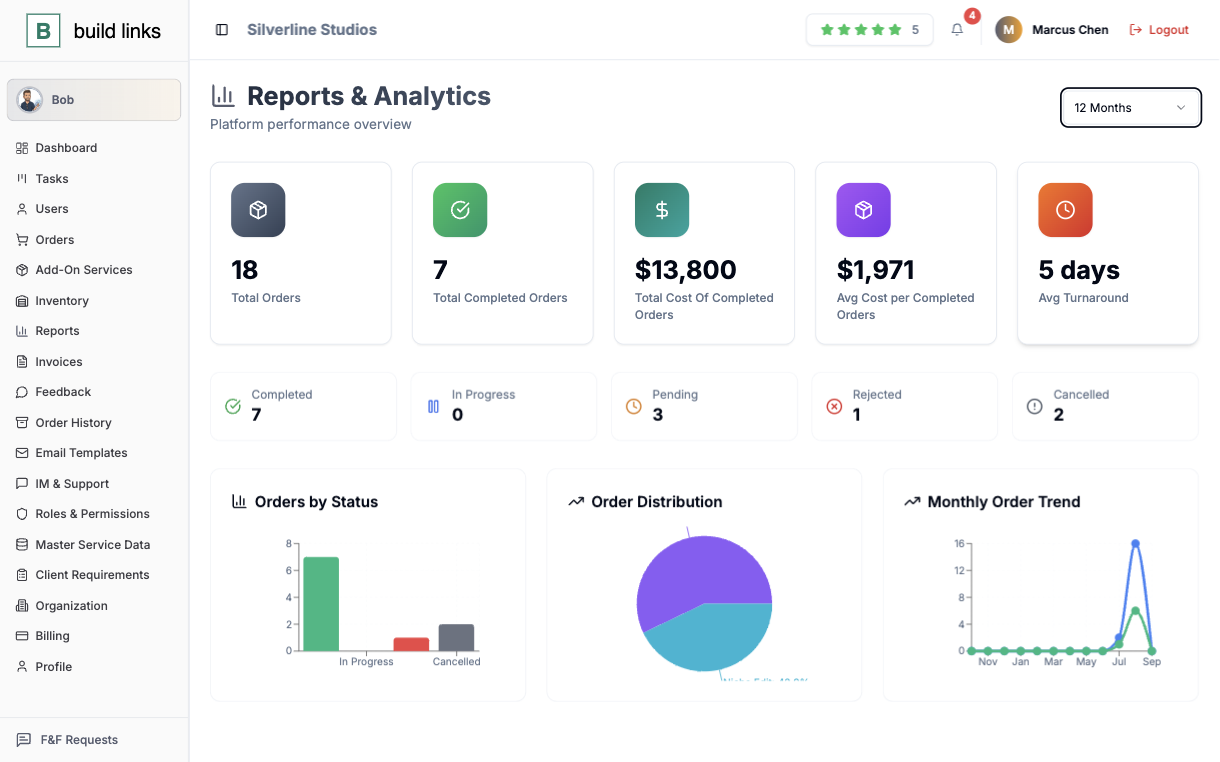
Total spend, average cost, and average turnaround, for whatever date range you pick.
Your clients log in to your company.
The part of BuildLinks a client touches carries your name. On the Agency plan it sits on your own domain, with your logo and colors.
Only their own orders
A client sees their orders and invoices, and nobody else's.
Your price, never your cost
What you paid for a placement stays on your side of the account.
A named Account Manager
Their dashboard shows a real person, with a photo, a title, and a direct line.
Updates without a nudge
Status changes and invoices reach them by email automatically.
Start alone. Add people when the work arrives.
The account you open as one person is the same one a full team runs later.
Just you
Everything a solo link builder needs to stop running orders from a spreadsheet.
- 200 orders a month
- 1,000 domains in your inventory
- Task board and wallet included
You and a few hires
Hand off part of the work without handing over the whole account.
- Sub Admins run their own book of clients
- Inventory Managers keep domains current, with no billing access
- Accountants see invoices and nothing else
An agency under its own name
Put your brand on the client side and raise the ceiling on volume.
- 500 orders a month and 5,000 domains
- Client portal on your own domain and email
- Bob, the assistant, included
Past that, the Custom plan removes the order and domain limits and takes up to 1,000 clients. Moving up changes your limits and leaves everything you set up in place.
See full pricingBuilt to scale down as well as up.
A ten-person agency and a one-person shop run the same software, differently.
More than one client, one system
Real per-role permissions, a client portal on your own domain, and invoicing that never shows a client what you paid for the link.
- Sub Admins manage their own book of clients, Inventory Managers keep domains current
- Your brand on every report, portal, and coupon your clients redeem
- Clients only ever see your price, never your cost
- Every change logged to the person who made it, Bob included
One person, the tooling of a whole team
The same order pipeline, the same inventory, the same invoicing - none of it requires a hire, or a spreadsheet open past nine.
- Every domain, price, and vendor in one inventory
- Links verified automatically when they go live
- Invoices generate themselves from completed orders
- A task board to keep your own to-do list next to the order it's for
Tell it what to do. It does the thing.
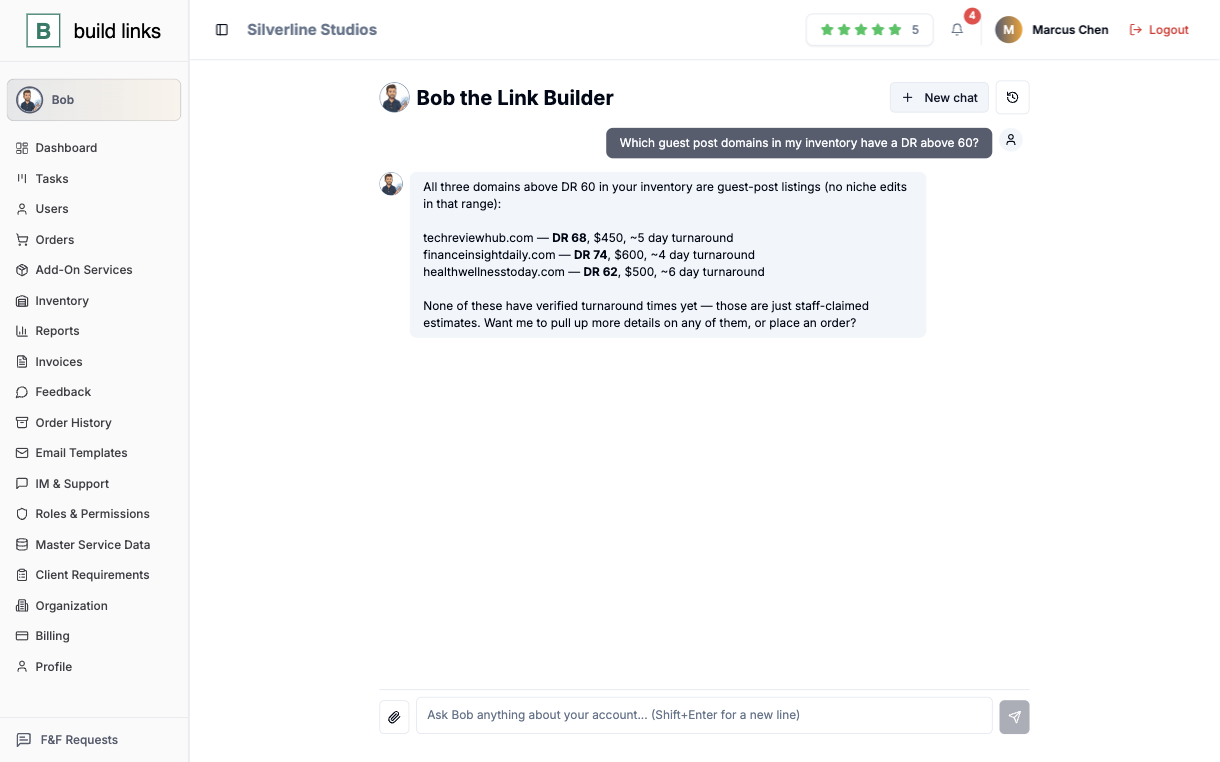
Place an order, check where ORD-0413 stands, move a due date - Bob acts inside whatever your role is already allowed to do, and stops to ask first if the action can't be undone.
Before you start a trial.
The questions that usually come up first.
In one inventory list - each domain carries its rating, traffic, and typical turnaround, plus your own price for that specific client, so quoting a new order means picking from what's already recorded instead of re-deriving a rate from an old message.
Every order moves through Pending, In Progress, and Completed (or Rejected), with links re-verified automatically the moment they go live - so a Completed status is a fact, not a guess.
Six roles, each scoped to their own view: Super Admins see everything, Sub Admins manage their own book of clients, Inventory Managers keep domains current without touching billing, Accountants see invoices only, and Clients (plus their Client Staff logins) see only their own orders.
Yes - Tasks is a kanban board with drag-and-drop columns, color-coded priority, and comments with @mentions. Cards tied to an order carry its guest post title, source and target URL, and anchor text, so the work never gets disconnected from the order it's for.
Invoices generate automatically from completed orders - line items, pricing, and due dates included - using due-date rules you set once per client, then download as branded PDFs.
Yes - every organization gets a wallet. Clients top it up directly or redeem a coupon you've issued (a direct credit, a deposit bonus, or a discount on a purchase), and invoices get paid instantly from the balance.
Yes - the Agency and Custom plans put your clients' dashboard on your own domain with your logo and colors, and clients only ever see the price you set, never your vendor cost.
Bob is BuildLinks' AI assistant, included from the Agency plan up - ask it to place an order, check a status, or update a due date, and it acts inside your role's existing permissions, asking first before anything irreversible.
No - every plan starts with a free trial, no credit card required, and you can cancel anytime.
What it takes to try it.
No credit card
Every plan starts with a free trial, and starting one takes no card.
No sales call, no setup fee
Create an account and place your first order yourself.
Cancel anytime
Run one client through it first. If it does not fit, you stop.
Move your first order off the spreadsheet today.
It takes less than five minutes to place it.
No credit card to start. Cancel anytime.